Your trains, in your pocket
A free app for PRASA trains (formerly Metrorail) in Cape Town, Gauteng, Durban and East London. Small by design, and it works offline.

- Under 250 KB for the whole app, the first time
- Works offline: no signal or data needed
- Kept current: we update the times when PRASA does
- No sign-up: no number, no name
When PRASA publishes new times, we update the app's timetable. Your phone picks it up the next time you're online: a download of just 2 to 30 KB.
Three screens, that's it
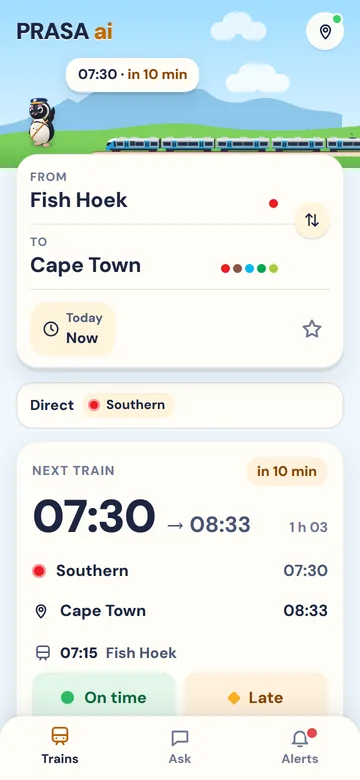
Pick your stations
Next train, arrival and every stop.
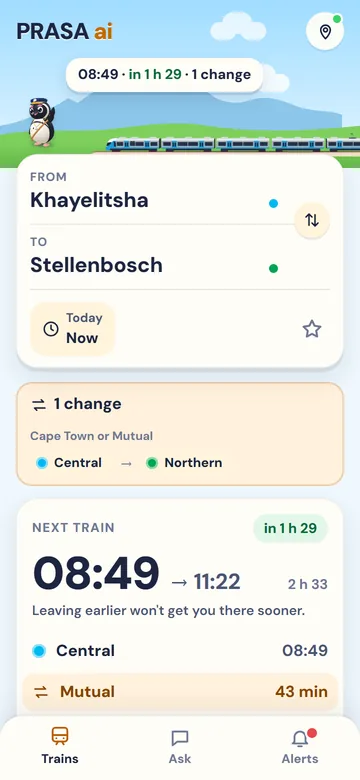
Know where to change
Which lines, where, and how long you wait.
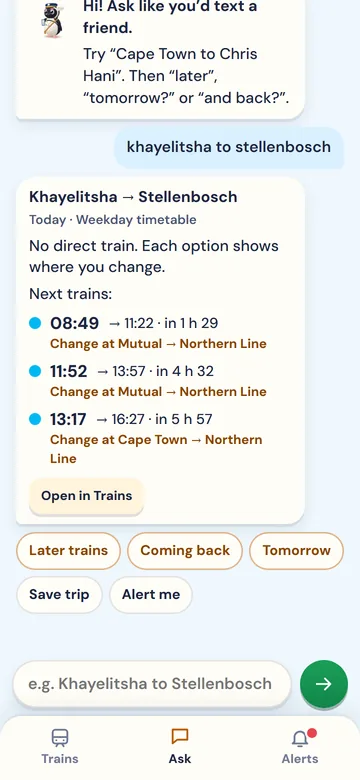
Or just ask
"Bellville to town at 7", like a chat.
Add it in three taps
Android
- Open prasaai.co.za/app in Chrome
- Tap Add to your phone
- Open it from your home screen
iPhone
- Open prasaai.co.za/app in Safari
- Tap Share, then Add to Home Screen
- Open it from your home screen
No Add button on Android? Open Chrome's ⋮ menu and tap "Install app" or "Add to Home screen". No Play Store needed. On iPhone, notifications only work from the home screen.
Good to know
- Times are PRASA's published timetables: scheduled, not live. Check PRASA's alerts before you go.
- A train shown moving along the line is an estimate from the timetable.
- PRASA publishes no Sunday timetables, and some lines have no Saturday one. The app tells you.
- Line alerts as notifications are coming soon.
Add the free app to your phone
Curious what the trains look like right now? Watch them in 3D.